hololive Dreams
Where to look on the
hololive Dreams screen
Where is your score? What does the combo number mean? Learn the screen basics before your next song.
Your score is at the top left, timing judgment near the bottom center, and combo count at the top right.
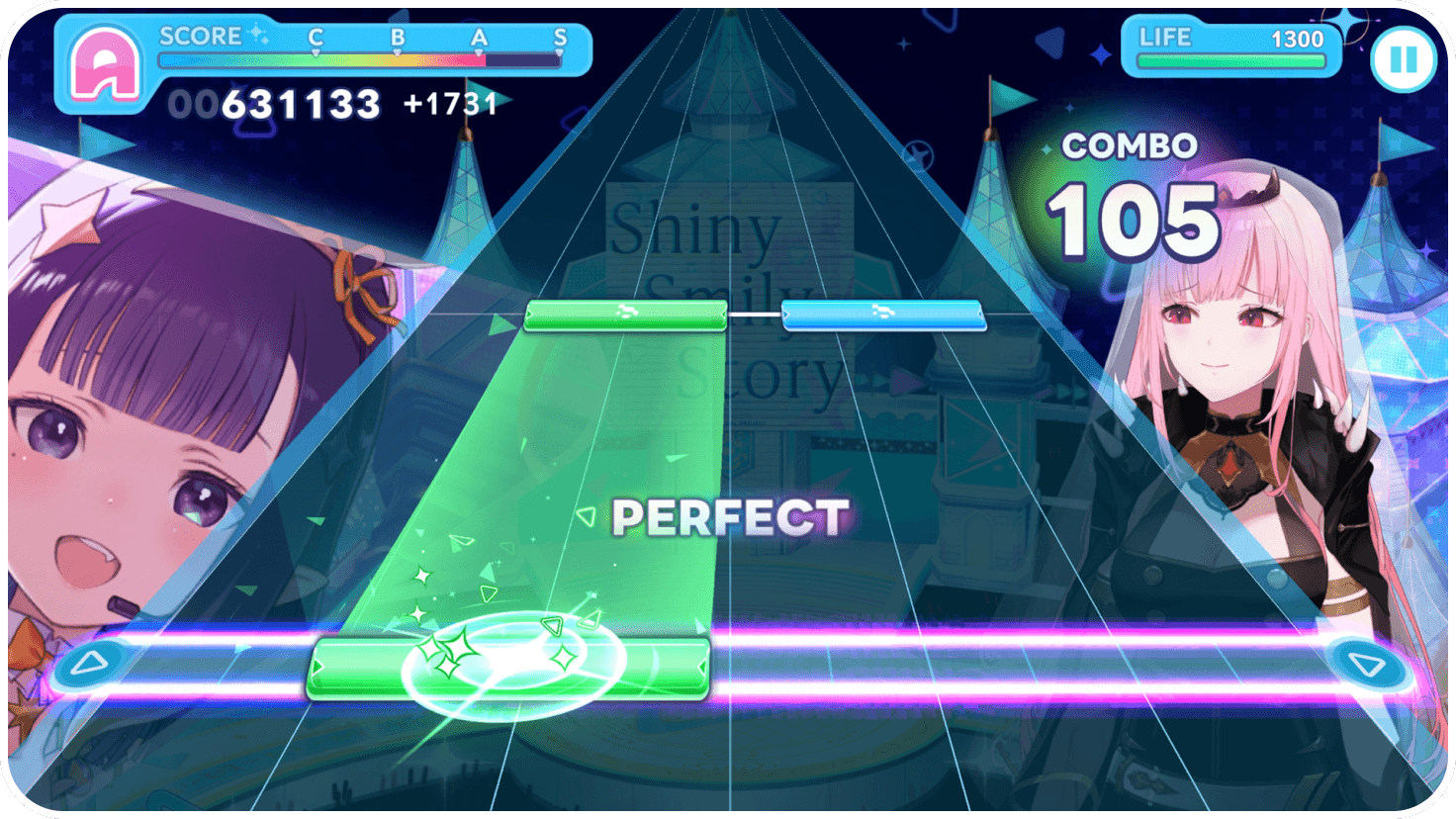
Read the score and rank
at the top left.
The number below SCORE is your current score. The gauge above it shows your progress along the C, B, A and S rank markers.
The pictured values are examples, not recommended targets.
What PERFECT and COMBO mean
PERFECT is a judgment of your timing on a note. COMBO counts the notes you have successfully hit in a row.
2. Judgment display
Look above the judgment line just after playing a note. The pictured judgment is PERFECT.
3. Combo display
When aiming for a full combo, watch whether this count keeps growing without breaking.
Finding the training-board controls
Unlock spaces on the Holomem Board to strengthen your members. The board controls are grouped at the bottom left.
Finding the effects control
Look for the star icon on the far left, labeled ボード効果. That is the Japanese label for Board effects.
Image sources and limits of this sample
All images are references from official promotional pages, not captures from our own testing. Rates, optimal teams and setting effects have not been tested. A public edition needs current gameplay captures and a separate image-use review.
Source: hololive Dreams official system page
© COVER / © QualiArts, Inc.