hololive Dreams
EASY / NORMAL: controls & practice
A foundation guide for reading and hitting notes on EASY / NORMAL. Change one thing at a time—speed, timing, or difficulty—then move to a suitable HARD chart.
Start EASY / NORMAL at a readable speed
Follow the music and make each action clean.
Read simultaneous hits and taps during holds without rushing.
Do not wait to clear every NORMAL; choose a HARD you can finish.
Read the next group above the judgment line
Faster notes alone are not progress. Start at a speed where you can separate the note to hit now from the next one.
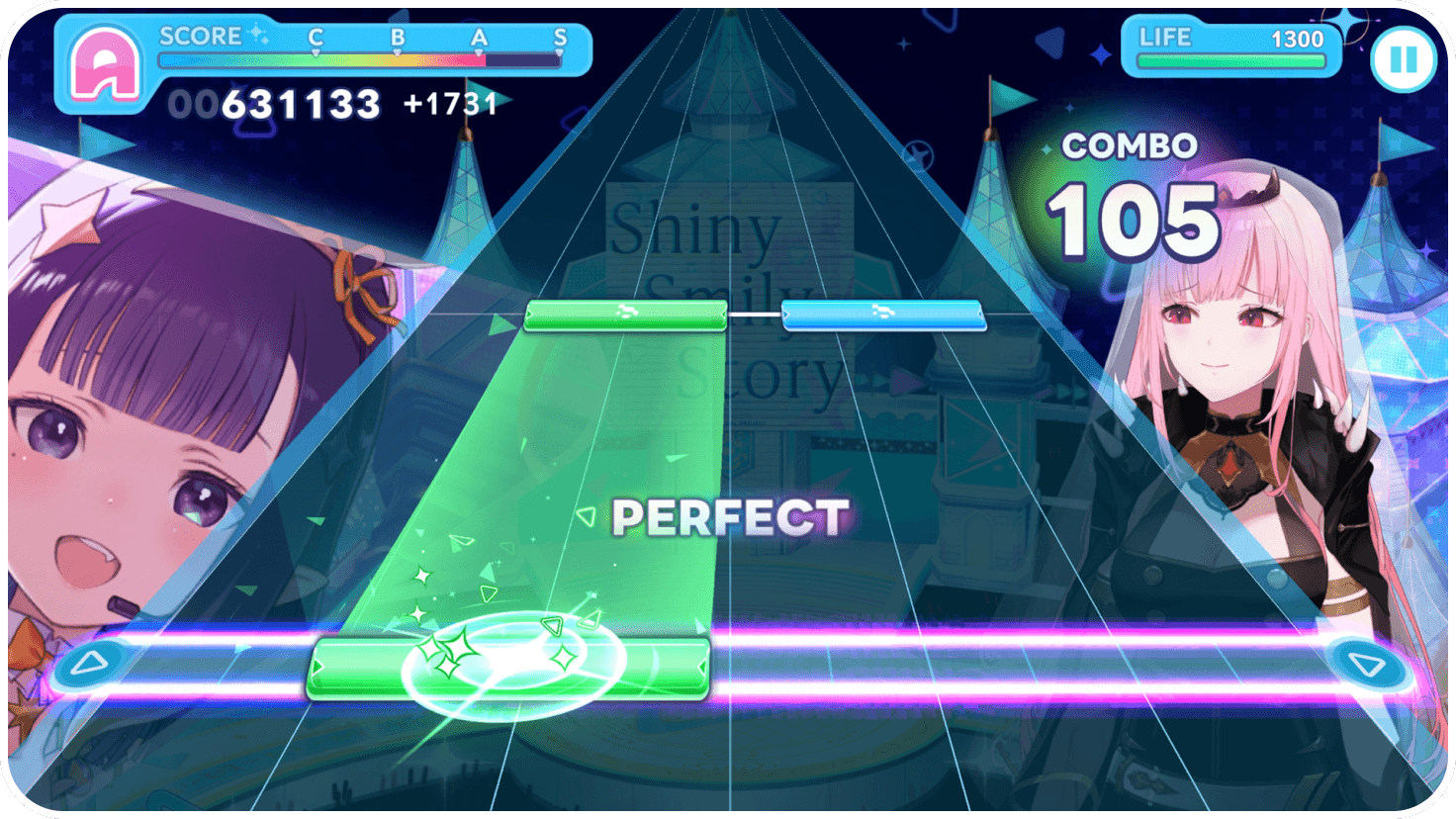
Learn five note types by action
Tap
Tap once as the blue note reaches the line. Alternate hands for fast runs instead of chasing every note with one finger.
Hold / slide
Hold from the start and follow the green path. Keep holding through a normal end; follow every checkpoint.
Flick
For a pink arrow, slide your finger across the screen. It need not be upward. A tap followed by lifting your finger can miss the flick.
Flick ending
Follow the hold to its final arrow, then flick. Releasing as soon as you notice the arrow is too early.
Accent
Yellow changes the accent, not the underlying action. Tap a tap and flick a flick; do not rush because the effect looks different.
Give your first three runs separate purposes
- Run 1: finish
After a miss, return attention to the next note. - Run 2: fix one thing
Focus on only one of flicks, holds, or simultaneous hits. - Run 3: confirm
Keep settings and grip unchanged to check whether it helped.
Fixes by symptom
After the flick, prepare for the next tap
1. Keep the flick short
2. Move the right finger to the centre
| Symptom | Next thing to try |
|---|---|
| Only holds break | Keep contact from start through end; add a flick only where an end arrow appears. |
| Only flicks miss | Use a short slide rather than a touch-and-lift; use the direction that stays reliable for you. |
| One side of simultaneous hits is late | Read the two same-height notes as a pair and hit together. If one hand is late, check its position before the pair. |
| FAST / SLOW repeats | Compare on the same chart and audio route, changing one setting at a time. |
What NORMAL adds
Keep the left hold; tap with the right
Tap while holding
Keep one finger down along the hold path and tap with the free side. Assign roles first instead of trying to move both at once.
Two close notes
Before counting them, decide whether they alternate or land together. Raise speed only after you can tell.
Flick at a hold end
Learn the hold and flick separately before combining them. Do not add a flick when there is no end arrow.
Treat visibility and timing as different problems
Choose what to adjust from the pattern of errors
FAST / SLOW bias across the song↓ Check audio output and timing
Errors only in one difficult passage↓ Check fingering and where you look
Use speed or lane visibility for crowding, and timing adjustment for repeated FAST/SLOW. Someone else’s values are a starting example, not a universal setting across devices and audio routes.
When to move from NORMAL to HARD
- You finish reliably
A full combo is not required. Choose a chart you can finish and describe where it breaks down. - Choose one approachable HARD
Prefer a familiar song; you need not jump to that song’s harder chart immediately. - Keep permission to step back
If reading collapses, return to NORMAL and isolate the action. Lowering difficulty is not failure.
Scope of this foundations guide
Control descriptions use official public guidance; setting experiments are general practice suggestions informed by player notes. This guide does not verify device-specific values, every chart, or the current in-game UI.
References & image credits
Open reference list (5)
- Official source ↗Learn five note types by action
- Official X: consecutive flick guidance ↗Accent
- Official X: hold-end guidance ↗Accent
- nanagi: player notes on settings and timing ↗Treat visibility and timing as different problems
- Official Ver.1.2.0 update, 29 September 2026 ↗
English explanations are editorial translations. © COVER / © QualiArts, Inc.